> For the complete documentation index, see [llms.txt](https://delta-robotics.gitbook.io/docs/llms.txt). Markdown versions of documentation pages are available by appending `.md` to page URLs; this page is available as [Markdown](https://delta-robotics.gitbook.io/docs/software/anvil.md).

# ANVIL

Turn solid parts and sealed internal cavities into printable gyroid lattices with ANVIL, an open-source tool that returns them in original CAD coordinates

ANVIL converts a solid part, or a sealed internal cavity inside one, into a printable gyroid lattice and hands the result back in the coordinates the file arrived in. It runs on your own machine as a local web app: drop in an STL or a STEP file, set the lattice parameters, generate, and export.

<figure><img src="https://1078621213-files.gitbook.io/~/files/v0/b/gitbook-x-prod.appspot.com/o/spaces%2Fm2yg571oTEEeXffjpREo%2Fuploads%2Fgit-blob-4c697146e21c9cf5498d4c30951ba5c408747e25%2Fanvil-hero.png?alt=media" alt="The ANVIL workspace showing a cylinder converted to a skeletal gyroid lattice, with the lattice parameter panel on the left and flow metrics and export controls on the right"><figcaption><p>The ANVIL workspace. A cylinder has been converted to a skeletal gyroid lattice; the lattice parameters sit on the left, and the flow metrics and export panel on the right.</p></figcaption></figure>

{% hint style="info" %}
ANVIL is open source under Apache-2.0 and pre-1.0. The HTTP API, the MCP tool schema, and the script globals can change in any 0.x release.
{% endhint %}

## Why a sealed cavity needs a lattice

A part with a large internal void is a problem for both major additive processes. On FDM, the slicer fills an enclosed void with support material that can never be removed, because there is no way in. On SLS and MJF, loose powder is trapped in the void with no escape path, which adds weight and wastes material.

Filling that void with a triply periodic minimal surface (TPMS) lattice fixes both. A TPMS sheet is self-supporting, so no support material is generated, and it is open-celled, so air and powder travel straight through. The lattice braces the walls while staying light and printable.

Existing tools stop short of that. A slicer applies infill to a whole model, not to one named cavity inside it. Mesh tools that can build a lattice hand back geometry in their own frame, so the result has to be realigned by hand before it is any use. ANVIL targets a specific cavity and never moves your coordinates, so the exported part drops back into Onshape or Fusion and merges with the original.

## Walk through a pneumatic manifold

This is a real fuse-mode job end to end: a 58 by 39 by 27 mm three-port pneumatic manifold with one internal gallery joining the ports. The gallery is sealed, so an FDM slicer has no way to fill it with anything but unremovable support. Parts like this route air to [AeroFlex](/docs/hardware/aeroflex.md) pneumatic muscles.

{% stepper %}
{% step %}

### Model the body

The body is the Positive: a rounded triangular block with a stepped counterbore for a push-to-connect fitting at each corner, plus a shallow pocket in the middle.

<figure><img src="https://1078621213-files.gitbook.io/~/files/v0/b/gitbook-x-prod.appspot.com/o/spaces%2Fm2yg571oTEEeXffjpREo%2Fuploads%2Fgit-blob-8f73106c2a9998cb94166c44ada151e5fba915c8%2Fanvil-manifold-positive.png?alt=media" alt="CAD render of the manifold body, a rounded triangular block with three stepped counterbores at its corners and a shallow circular pocket in the middle"><figcaption><p>The manifold body in CAD. The orange internal gallery is visible through the bottom of each counterbore.</p></figcaption></figure>
{% endstep %}

{% step %}

### Export the gallery as its own solid

In CAD, the internal air path is a body you can export on its own. Here it is a chevron plate with a short cylindrical stub rising to the center port. That export is the Negative.

<figure><img src="https://1078621213-files.gitbook.io/~/files/v0/b/gitbook-x-prod.appspot.com/o/spaces%2Fm2yg571oTEEeXffjpREo%2Fuploads%2Fgit-blob-357aa21c29b9131eefd1b6eddaad9c8b356d6923%2Fanvil-manifold-cavity.png?alt=media" alt="CAD render of the gallery volume exported as a standalone orange solid, a flat chevron-shaped plate with two rounded arms and a short cylinder standing on its top face"><figcaption><p>The internal gallery, exported as a standalone solid.</p></figcaption></figure>
{% endstep %}

{% step %}

### Confirm the gallery is sealed

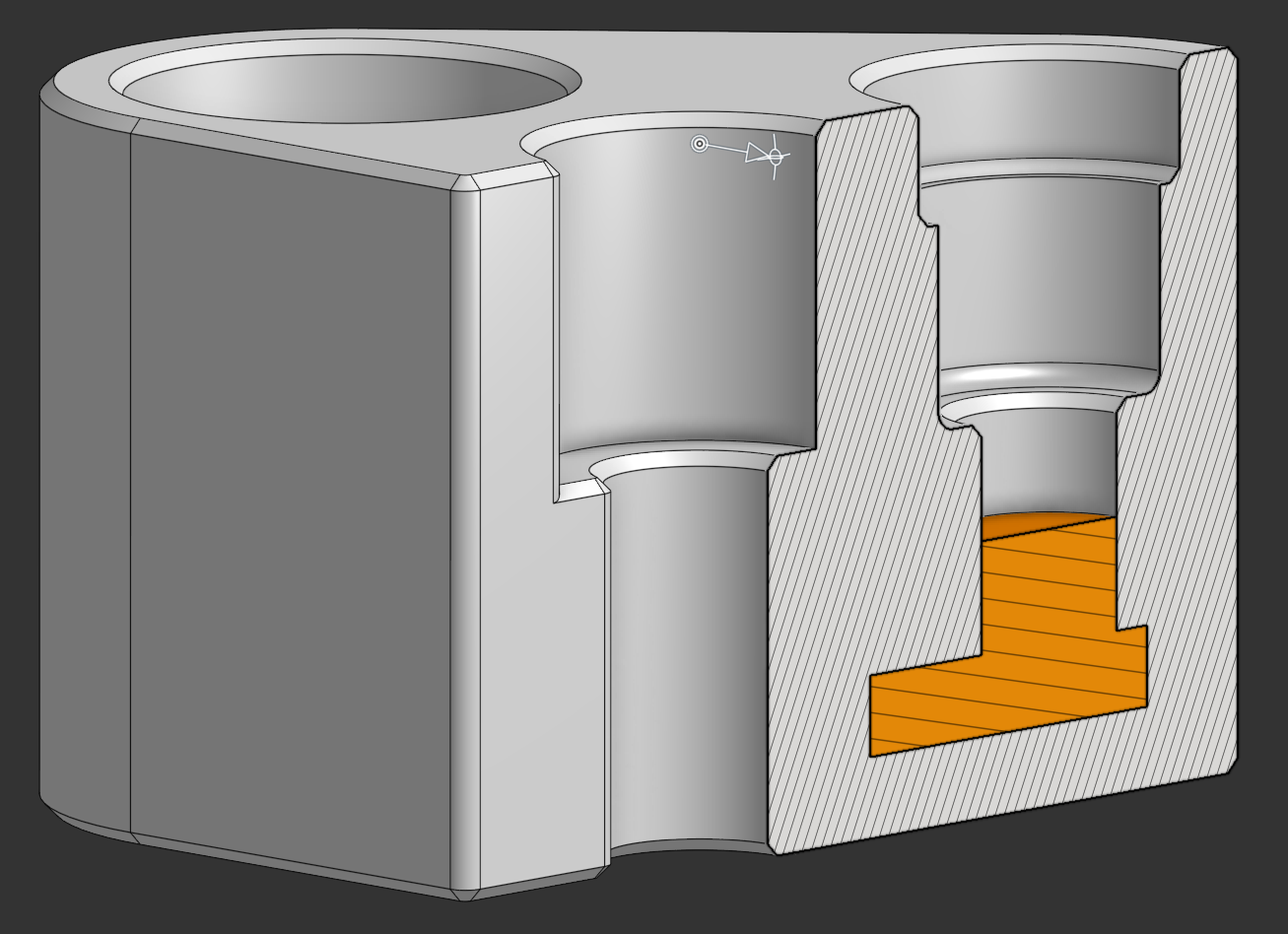
Sectioning the body shows why the lattice is needed. The gallery is enclosed by the block, with no path to any outside face.

<figure><img src="https://1078621213-files.gitbook.io/~/files/v0/b/gitbook-x-prod.appspot.com/o/spaces%2Fm2yg571oTEEeXffjpREo%2Fuploads%2Fgit-blob-aa199b36a97b724df22b8fe353c25ea084d7a4cd%2Fanvil-manifold-section.png?alt=media" alt="Sectioned CAD render of the manifold cut vertically through two counterbores, showing the orange gallery running as a stepped channel low in the block, sealed on every side by hatched material"><figcaption><p>A section through two counterbores. The gallery is sealed on every side.</p></figcaption></figure>
{% endstep %}

{% step %}

### Fuse it in ANVIL

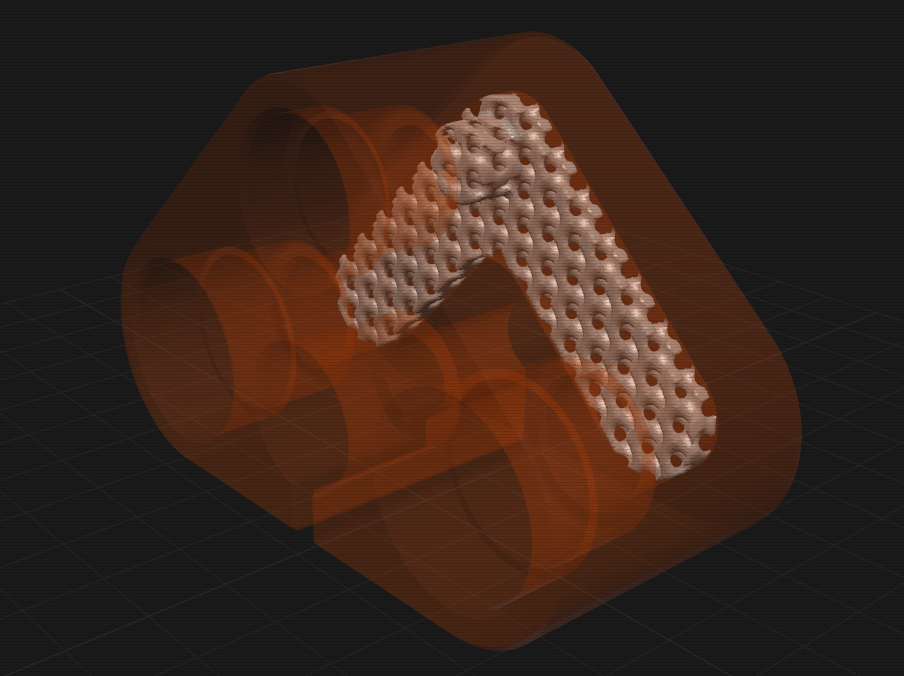
Load both files, set the body to **Positive** and the gallery to **Negative**, then click **GENERATE**. The gallery is filled with a gyroid and voxel-boolean fused into the body as one watertight solid.

<figure><img src="https://1078621213-files.gitbook.io/~/files/v0/b/gitbook-x-prod.appspot.com/o/spaces%2Fm2yg571oTEEeXffjpREo%2Fuploads%2Fgit-blob-fb1c51018274dd51b0c734a875958f5d8a594df6%2Fanvil-manifold-lattice.png?alt=media" alt="The ANVIL viewport showing the manifold body as a translucent orange ghost with a solid light gray gyroid lattice inside it, exactly filling the chevron gallery"><figcaption><p>The generated result. The gyroid follows both arms of the gallery and the corner between them.</p></figcaption></figure>
{% endstep %}

{% step %}

### Slice it

The exported STL comes back in the original CAD frame, so it drops straight into the slicer with no realignment. Nothing is trapped and no support is generated inside the gallery.

<figure><img src="https://1078621213-files.gitbook.io/~/files/v0/b/gitbook-x-prod.appspot.com/o/spaces%2Fm2yg571oTEEeXffjpREo%2Fuploads%2Fgit-blob-004e51cd69bb3996a0f7825bda154bba8057f41d%2Fanvil-manifold-sliced-section.png?alt=media" alt="Slicer preview cut open horizontally, showing the chevron gallery packed with self-supporting gyroid extrusions inside the perimeter walls and no support material anywhere in the enclosed volume"><figcaption><p>The slicer preview, cut open. Gyroid extrusions fill the gallery, with no support material in the enclosed volume.</p></figcaption></figure>
{% endstep %}
{% endstepper %}

## The two workflows

The role you assign each part decides the mode.

| Roles in the parts list                | Mode       | What happens                                                                                                |
| -------------------------------------- | ---------- | ----------------------------------------------------------------------------------------------------------- |
| Exactly one **Part**                   | **single** | The whole solid is latticed.                                                                                |
| One **Positive** plus one **Negative** | **fuse**   | The Negative's volume is latticed and voxel-boolean fused into the Positive, producing one watertight part. |

Selection overrides the role-derived mode. With several parts loaded, selecting one of them targets it for single mode, and selecting a Positive plus a Negative targets that pair for fuse mode, so you can lattice one part out of five without changing any roles. Zone roles are ignored for targeting, and the note under `GENERATE` always names the target it is about to lattice.

For fuse mode, model the positive and the cavity negative in one shared coordinate system. The result inherits that frame.

## Install and run ANVIL

ANVIL builds against a patched fork of PicoGK, consumed by project reference. Clone that fork as a **sibling directory** of `anvil`, not inside it. Upstream `leap71/PicoGK` is not a drop-in substitute: it keeps its sources at the repository root and ships no prebuilt native DLLs.

| Requirement  | Detail                                                                                                                                                          |
| ------------ | --------------------------------------------------------------------------------------------------------------------------------------------------------------- |
| **OS**       | Windows x64, version 10 or 11.                                                                                                                                  |
| **.NET**     | .NET 9 SDK, so `dotnet --version` reports `9.0.x`.                                                                                                              |
| **PicoGK**   | A sibling checkout at `..\PicoGK` of the patched fork. The native runtime DLLs are copied next to `AnvilWorker.exe` on build, so no System32 install is needed. |
| **Python**   | Python 3.14 with `build123d` and `cadquery-ocp`. The default path is `C:\Python314\python.exe`, overridable with `PythonPath` in `appsettings.json`.            |
| **Internet** | First load only. The viewer pulls three.js from a CDN.                                                                                                          |

```powershell
cd C:\Users\you\Repos
git clone https://github.com/Delta-Robotics-Inc/anvil.git
git clone https://github.com/Kevofehr/PicoGK.git PicoGK   # the sibling checkout is mandatory

C:\Python314\python.exe -m pip install build123d cadquery-ocp

cd anvil
scripts\run.ps1
```

{% hint style="info" %}
[The patched PicoGK fork](https://github.com/Kevofehr/PicoGK) is a modified distribution of [LEAP 71's PicoGK](https://github.com/leap71/PicoGK), restructured so ANVIL can reference it directly and shipped with the prebuilt native binaries. Clone it as a sibling of `anvil`, not inside it. If you want PicoGK itself rather than an ANVIL build, use the upstream project.
{% endhint %}

`run.ps1` builds the solution, verifies that the worker executable, the Python interpreter, and the sidecar script are all present, starts the server on `http://127.0.0.1:5238`, waits for `/api/health` to answer, and opens your browser. Add `-NoBrowser` to stay headless.

To confirm the install, drag `samples\hollow_bracket.step` onto the drop zone, leave the role as **Part**, and click **GENERATE**. You get a watertight gyroid-filled solid in about a second.

{% hint style="warning" %}
ANVIL runs arbitrary C# with your user privileges and binds an unauthenticated port. Read [Security](#security) before you connect an agent or run a script you did not write.
{% endhint %}

Windows is the only supported platform. PicoGK ships an `osx-arm64` native runtime, so the worker could in principle run on Apple Silicon, but the launcher, the default paths, and the native DLL copy step are Windows-first and untested elsewhere.

## Working with the lattice

The `LATTICE` view holds the TPMS parameters and the pinned `GENERATE` button.

| Parameter                    | Meaning                                                                        | Guidance                                                                                         |
| ---------------------------- | ------------------------------------------------------------------------------ | ------------------------------------------------------------------------------------------------ |
| **Pattern**                  | Gyroid, Schwarz P, Schwarz D, Lidinoid, or Neovius.                            | Gyroid is the default: smooth, near-isotropic, printable in any orientation.                     |
| **Cell size (mm)**           | Unit-cell period.                                                              | Larger is coarser, lighter, and faster. Typical 6 to 12 mm. Default 8.                           |
| **Wall thickness (mm)**      | Thickness of the TPMS sheet.                                                   | Keep at or above your printer's minimum wall, roughly 0.8 to 1.2 mm for FDM. Default 1.2.        |
| **Resolution (voxel mm)**    | Voxel edge length, the sampling grid.                                          | Smaller is finer but costs O(n^3) memory and time. 0.2 to 0.4 mm. Default 0.3.                   |
| **Overlap (mm)**, fuse only  | How far the lattice grows past the cavity wall for a watertight joint.         | 0.2 to 0.5 mm. Too small leaves a hairline seam. Default 0.3.                                    |
| **Smoothing (mm)**           | Optional triple offset that rounds sharp lattice edges.                        | 0 is off and fastest. 0.1 to 0.3 softens facet ridges.                                           |
| **Bias (mm)**, skeletal only | Shifts the field iso-level, thickening or thinning the struts. Range -5 to +5. | Negative gives thinner struts and a more open channel. Replaces wall thickness in skeletal mode. |
| **Flow axis**                | The direction the flow profile and permeability are measured along.            | Pick the axis fluid or powder actually travels. Default Y.                                       |

{% hint style="warning" %}
**Resolution guard.** The server rejects a job when the largest part dimension divided by the voxel size exceeds roughly 2000 voxels per axis, and warns above roughly 2e9 total voxels. Start coarse at 0.4 mm and refine.
{% endhint %}

Turning on `PREVIEW` raymarches the lattice field on the GPU inside the target part, so scrubbing cell size, wall thickness, bias, or pattern redraws it frame by frame instead of after a bake. The preview is an approximation. It skips voxelization, smoothing, island cleanup, and the fuse overlap, so **the bake is the ground truth** for export, watertightness, volume, and every flow metric.

### Sheet vs skeletal

A TPMS field is one minimal surface dividing space into two interpenetrating volumes, and the two modes keep different parts of it solid.

* **Sheet** thickens the surface itself into a wall. The solid is a thin membrane and both labyrinths either side stay open, giving two air networks that never connect. Best stiffness to weight, and the safe default for cavity venting.
* **Skeletal** keeps one of the two volumes solid and leaves the other as a single continuous channel. One connected pore means lower, more predictable flow resistance, at some cost in isotropic stiffness.

Use sheet for light bracing and powder escape on both sides. Use skeletal when one clear flow path, for cooling, filtration, or fluidics, matters more than symmetric stiffness.

### Zoned lattice

Instead of latticing a whole body, section off regions with roles layered on a base part. **Zone / Lattice** is where the lattice fills, **Zone / Keep** stays solid, and **Zone / Void** is never latticed. Three offsets control the result: skin (inward clearance off the part surface), transition (accepted and stored, not yet applied), and keep-out grow (an outward margin around every void).

Zone algebra runs in a fixed order, and void always wins: the grown voids are subtracted last, with a self-check confirming they are clear. With zones active, porosity and infill are measured against the lattice region rather than the whole bounding volume.

## The tool palette

ANVIL is an object workspace, not only a converter. Seven tools each take over the left panel with their own parameters and a confirm button. None of them has a part dropdown: an operation runs on what is selected in the canvas or the objects list, in pick order.

| Tool       | What it does                                                                                                                                       |
| ---------- | -------------------------------------------------------------------------------------------------------------------------------------------------- |
| **PRIM**   | Adds a box, cylinder, sphere, or cone at an explicit center, in file coordinates.                                                                  |
| **BOOL**   | `UNION`, `DIFFERENCE`, `INTERSECT`, or `SMOOTH` (a filleted union with a blend radius). Binds to the first two parts you picked and consumes both. |
| **SHELL**  | Hollows a part into a wall, inward, outward, or centered, leaving out any flat faces you pick as open faces.                                       |
| **OFFSET** | Grows or shrinks the part by a signed distance.                                                                                                    |
| **XFORM**  | Non-destructive translate, rotate, and scale with live preview. `APPLY` bakes a new part.                                                          |
| **MIRROR** | Reflects across a plane, winding-corrected.                                                                                                        |
| **DUPE**   | Makes an independent copy of the selected part.                                                                                                    |

Every tool is non-destructive: it runs a worker job that produces a new derived part carrying a provenance line, such as `TPMS / GYROID` or `PRIM / BOX 60x40x20`. PRIM, MIRROR, and the `XFORM` bake never touch the voxel kernel, so they are geometrically exact. BOOL, SHELL, and OFFSET run through PicoGK and are accurate to plus or minus half a voxel, and they reject feature sizes at or below 1.5 times the voxel size.

The part store lives in memory. Uploaded and derived parts do not survive a server restart.

## Export and projects

Tick any number of objects in the `EXPORT` tile, pick a format, and export. A latticed object exports its lattice mesh. Per-part transforms are baked at export time, once, and nothing is ever recentered. Several parts export either as a zip of one file each or combined into a single merged file.

* **STL is lossless.** It is the result mesh.
* **STEP is best-effort and faceted.** The sidecar sews the triangle mesh into a faceted B-rep solid where every triangle becomes one planar face, because a true analytic B-rep of a gyroid is impossible in any CAD tool. Files are large, so the triangle count is budgeted: the worker coarse-remeshes above the `STEP target` set in the `EXPORT` tile (default 60,000), warns above 150,000, and refuses above 500,000. Around 60,000 triangles produces a 135 MB STEP file in about 20 seconds.

Prefer STL for slicing. Use STEP when you need to boolean-merge the result back in CAD.

`SAVE` and `OPEN` in the header put a whole session in one `.anvil` file, which is a plain ZIP holding a `project.json` manifest plus one binary STL per row, and a second STL for a latticed row's lattice mesh. The bundle carries each object's name, role, color, visibility, transform, and provenance line, along with the up axis and every `LATTICE` panel value. STL bytes are copied without a transform applied, so an export taken after an open is byte-identical to one taken before the save. Scripts are not bundled, because they live in the server-side library and are shared across projects.

## Flow metrics

When a job finishes, the `FLOW` tile reports geometric flow descriptors computed from the voxel field and result mesh, sampled in up to 128 bins along the chosen flow axis.

{% hint style="warning" %}
These are fast geometric estimates, not a CFD solution. There is no Navier-Stokes, no turbulence, and no fluid model. Use them to compare lattices and find a choke, not to predict an absolute pressure drop.
{% endhint %}

| Metric                 | Definition                                                        | Notes                                                                        |
| ---------------------- | ----------------------------------------------------------------- | ---------------------------------------------------------------------------- |
| **Porosity**           | Open (air) fraction of the envelope volume.                       | Free volume is reported in cm3.                                              |
| **Open-area profile**  | Open cross-section area per bin against the part's envelope area. | Plotted as a sparkline.                                                      |
| **Choke**              | The minimum open cross-section, and where it occurs.              | The flow-limiting constriction. Choke ratio compares it to the widest slice. |
| **Specific surface**   | Surface area per unit envelope volume.                            | High values mean good heat and mass transfer, and more drag.                 |
| **Hydraulic diameter** | `4 * porosity / specific surface`.                                | The standard porous-media characteristic pore size.                          |
| **Permeability**       | Kozeny-Carman, in m2.                                             | Geometric permeability of the pore network along the flow axis.              |
| **Pressure drop**      | Darcy, at the reference flow rate.                                | Labeled EST. Linear in flow, derived from the geometric permeability.        |

The tile also surfaces worker warnings, such as a sheet lattice's two-independent-air-networks note, or a near-total choke.

## Coordinate preservation

Your file's frame is never modified. The `UP` chips in the view strip choose which world direction reads up on screen (`+Y`, the default, plus `-Y`, `+Z`, and `-Z`), and the build plate is drawn normal to that axis. That choice is a display convention only: no geometry is moved, and exports are byte-identical across all four modes.

Every stage operates in the source world frame. STL files load and save in millimeters, TPMS fields are world-anchored, no boolean recenters, and the viewer fits the camera with a bounding-box union instead of moving the mesh. An imported part always arrives with an identity transform.

The exported part therefore lands exactly where the original did, to within half a voxel. Import the STEP into Onshape or Fusion and it slots into place and boolean-merges with the source part, with no manual mesh alignment.

Because nothing is corrected on import, pick the up axis your CAD actually uses. If a specific part is genuinely upside down in its own file, fix it with an explicit `XFORM` or `LAY FLAT`, which stays visible in the transform panel and can be cleared.

## Drive ANVIL from an agent

ANVIL hosts an in-process [Model Context Protocol](https://modelcontextprotocol.io) server at `/mcp`, over streamable HTTP, stateless, exposing 21 tools. Any MCP client can list parts, run every tool operation, generate lattices, run scripts, and export results.

```bash
claude mcp add anvil --transport http --url http://127.0.0.1:5238/mcp
```

Tools that spawn jobs poll to completion internally, at 250 ms with a 10 minute cap, and return the terminal job as JSON, so an agent sees synchronous results. Structured worker errors, including a script's compile diagnostics, pass straight through. The `get_forge_reference` tool serves the Forge reference as markdown, and `run_script` and `save_script` tell an agent to read it first, so an agent writing geometry has the whole command vocabulary before its first compile.

{% hint style="danger" %}
Connecting an agent to `/mcp` grants that agent code execution on this machine. Only connect agents you trust, and see [Security](#security).
{% endhint %}

## Write scripts against the Forge API

ANVIL compiles and runs user C# scripts (`.csx`) against the PicoGK and `Anvil.Worker` APIs in a per-job worker process. This is the escape hatch for parts the fixed palette cannot express: parametric heat exchangers, functionally graded lattices, anything expressible with signed distance fields. Run one from the `SCRIPTS` toolbar view, from `POST /api/scripts/run`, or with the `run_script` MCP tool.

Scripts are written against **Forge**, a flat command layer over the voxel kernel that is auto-imported into every `.csx`. Units are millimeters, angles are degrees, and +Y is up. Every builder's `at` is the shape's center and defaults to the origin, and commands never mutate their inputs. The five commands that have an axis (`Cylinder`, `Cone`, `Loft`, `Torus`, and `ArrayRadial`) take `axis: "z"` to build along +Z instead.

```csharp
Shape plate = Box(60, 4, 40);
Shape boss  = Cylinder(d: 12, h: 8, at: V(0, 6, 0));
Shape body  = SmoothUnion(plate, boss, radius: 2);
Shape holes = ArrayRadial(Cylinder(4, 20), count: 6, radius: 20);
SavePart("bracket", Subtract(body, holes));
```

Seven annotated examples ship in `scripts-library/` and appear in the `EXAMPLES` picker.

| Script                    | What it makes                                                                                                                                      |
| ------------------------- | -------------------------------------------------------------------------------------------------------------------------------------------------- |
| `rocket_nozzle.csx`       | A regeneratively cooled bell nozzle: Rao contour, graded hot-gas wall, 22 helical cooling channels under their own jacket, bolted injector flange. |
| `heat_exchanger.csx`      | A two-domain TPMS counterflow heat exchanger whose circuit separation the script measures and proves.                                              |
| `compliant_wheel.csx`     | An airless 180 mm rover wheel with three counter-handed bands of spiral ribs and a chevron tread.                                                  |
| `embossed_card.csx`       | An 85.6 by 54 by 1.6 mm card with the ANVIL emblem raised on the front and engraved on the back.                                                   |
| `manifold_block.csx`      | A ported pneumatic manifold whose internal gallery is filled with a gyroid.                                                                        |
| `graded_lattice_puck.csx` | A 40 by 15 mm puck filled with a radially graded skeletal gyroid, dense at the rim and open in the middle.                                         |
| `forge_smoke.csx`         | Two demo parts plus an assertion per Forge command, checked against the analytic answer.                                                           |

[Forge scripting](https://github.com/Delta-Robotics-Inc/anvil/blob/main/docs/scripting.md) is the canonical reference: every command with its signature, units, defaults, and meaning, plus the script globals, the voxel-size rule, and a worked example.

## Security

{% hint style="danger" %}
**ANVIL runs arbitrary C# with your user privileges. There is no sandbox.** A script can read, write, and delete anything your account can, open network connections, and start processes. The server binds `127.0.0.1` and has **no authentication**, so anyone who can reach the port can run code as you. Connecting an agent to `/mcp` grants that agent code execution on this machine. Per-job worker processes give crash isolation and cleanup, **not** a security boundary. Do not bind the server to a public interface, port-forward it, or expose it through a tunnel. Treat a `.csx` file exactly like an executable someone handed you, and read it before you run it.
{% endhint %}

The full policy, including what is and is not a reportable vulnerability, is in the repository's [security policy](https://github.com/Delta-Robotics-Inc/anvil/blob/main/.github/SECURITY.md). Report a vulnerability through GitHub private vulnerability reporting or by email, never in a public issue.

## Common failures

<details>

<summary>The build fails with "project file ..\..\PicoGK\src\PicoGK.csproj was not found"</summary>

PicoGK is missing or in the wrong place. It must be a sibling of `anvil`, not inside it, and it must be the patched fork. Upstream `leap71/PicoGK` keeps its sources at the repository root, so the project reference does not resolve.

</details>

<details>

<summary>run.ps1 cannot find Python, or STEP import fails immediately</summary>

Set `PythonPath` in `appsettings.json` to your interpreter, then confirm `build123d` and `cadquery-ocp` are installed into that same interpreter. Running `C:\Python314\python.exe -c "import OCP, build123d"` shows the real import error.

</details>

<details>

<summary>The job is rejected with a resolution error</summary>

The part is too big for that voxel size. Raise the voxel size; the guard trips above roughly 2000 voxels per axis.

</details>

<details>

<summary>Parts vanished after restarting the server</summary>

Expected. The part store is in memory only. Save a `.anvil` project to keep a session.

</details>

## License and source

ANVIL is licensed under Apache-2.0 and developed in the open. Issues and pull requests are welcome, and documentation fixes and new `scripts-library/` examples need no geometry expertise.

<a href="https://github.com/Delta-Robotics-Inc/anvil" class="button primary" data-icon="github">ANVIL on GitHub</a>

The voxel kernel doing the heavy lifting is [PicoGK](https://github.com/leap71/PicoGK) by LEAP 71, also Apache-2.0. It handles the booleans, offsets, TPMS rendering, and meshing; ANVIL builds against a patched fork of it. STEP import and faceted B-rep writing go through build123d and cadquery-ocp, and the browser viewer is built on three.js.

## Related pages

* [Software](/docs/software.md): the rest of the Delta Robotics software stack
* [AeroFlex](/docs/hardware/aeroflex.md): the pneumatic muscle line these manifolds feed
* [ANVIL on GitHub](https://github.com/Delta-Robotics-Inc/anvil): source, samples, and the full README
* [Forge scripting reference](https://github.com/Delta-Robotics-Inc/anvil/blob/main/docs/scripting.md): every scripting command
* [ANVIL changelog](https://github.com/Delta-Robotics-Inc/anvil/blob/main/CHANGELOG.md): what changed in each release